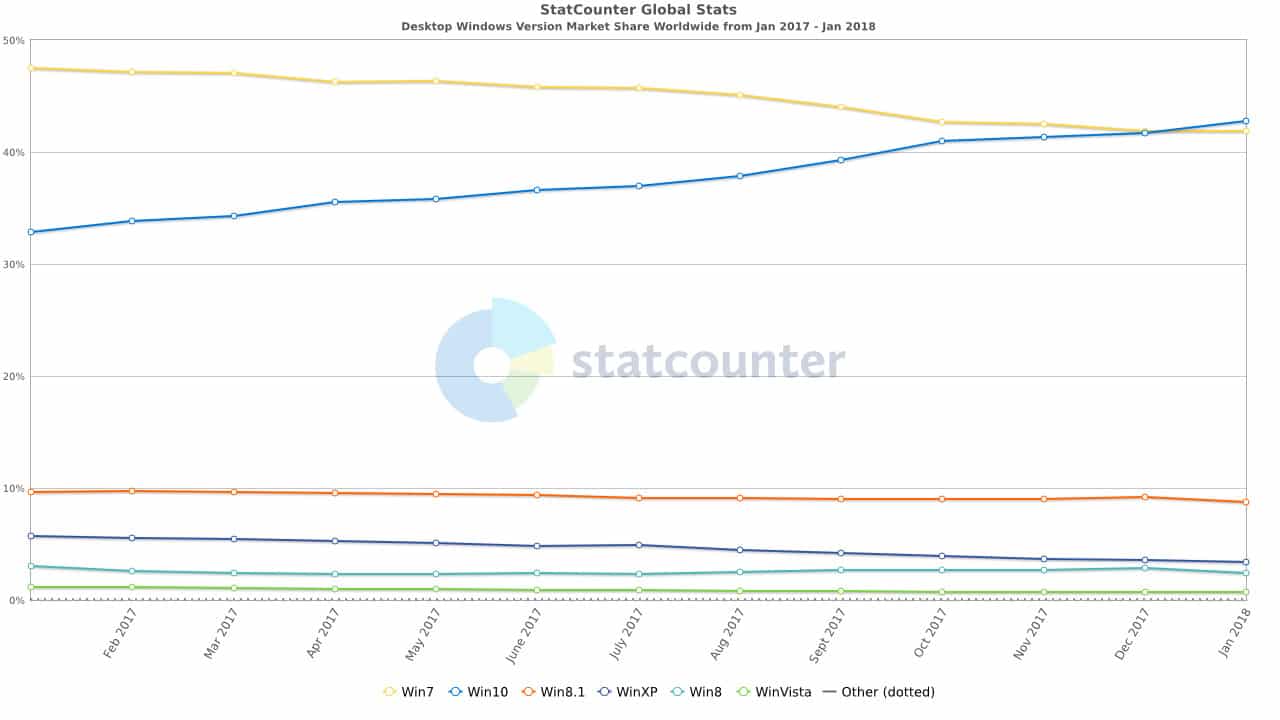
Windows 7 is clearly the number 1 operating system in the world right now and I do not see that changing anytime soon, especially with people choosing Windows 7 over the newly released Windows 8. Even though Windows 7 is the number 1 choice for 47.5 percent of IT workers Forrester analyst J.P. Gownder says that it’s yet to reach the “ubiquity” of Windows XP in the enterprise market.
+Continue Reading
Windows 8, it seems like we have been hearing a lot about it over the past couple of months. Recently Microsoft has released the consumer preview, which is free to download so you can try out the new operating system before it ships. If you have ever installed any Windows operating system from a CD or DVD you know it can be very time consuming. Why not speed up the process by installing the operating system using a USB flash drive. In this article we will show you how to take the Window 8 ISO and put it on a flash drive for fast and easy installation.
+Continue Reading
It may be hyperbolically named, but Windows 7’s God Mode is indeed omnipresent. It conveniently puts hundreds of settings from all around the operating system all in one place. It is really easy to setup and use. Read on to see how to turn on God Mode and make your Windows 7 experience even better….
+Continue Reading
Windows 7, I’m sure you have heard of it by now. Already Microsoft has a new operating system, hopefully this one won’t be a disaster like Vista was. If you installed Vista or even later versions of XP from a DVD you know that it was very time consuming. Why not speed up the process by using a flash drive to install Windows 7. Windows 7 is currently in beta and Microsoft is offering it free to anyone to try out until August. In this article we will show you how to take the Windows 7 ISO and put it on a USB flash drive for fast and easy installation.
+Continue Reading
Stay Connected With Us!