http://www.thinkcomputers.org/wp-content/uploads/2013/06/front-large.jpg
Intel Core i7-4770K Haswell Processor Review
Just a year ago Intel launched their Ivy Bridge processors and now a year later we have another platform launch from Intel. The 4th Generation Core Haswell processors are the “tock” to Intel’s “tick” and “tock” release schedule. A “tock” represents a new architecture and a “tick” represents a process refinement. So Haswell brings with it a new architecture, but is still built on the same 22nm process as Ivy Bridge. Intel has introduced a new LGA1150 socket with Haswell and a new chipset so you will not be able to throw this processor in an older motherboard, you will have to buy a new one. Today we are taking a look at the top of the line Haswell desktop chip the Core i7-4770K. Of course the “K” denotes that it is an unlocked processor. This is a quad-core processor that has a default clock speed of 3.5 GHz and a turbo frequency that goes all the way up to 3.9 GHz.
http://www.thinkcomputers.org/wp-content/uploads/2013/06/front3.jpg
XSPC AX Radiator Desk Stand Review
One of the biggest limiting factors in what you can do with watercooling is how much room you have in your case. With so much equipment to pack in for watercooling alone, space ends up being one of the chief concerns for builders and modders. And the single biggest limiting factor: how much radiator one can fit. Radiators are large, bulky, and inflexible in how they need to be installed. This can easily lead to the builder having to sacrifice cooling surface for space. There is a solution to this problem though; external radiator stands. And if you have chosen to use XSPC’s AX series of radiators, then you’re in luck. Today we will be looking at the AX Radiator Desk Stand from XSPC.
http://www.thinkcomputers.org/wp-content/uploads/2013/06/phantom630.jpg
Win a NZXT Phantom 630 Case!
It is summer time and it is the perfect time to give you, our readers some free hardware! We have teamed up with our friends at NZXT to give away a brand new NZXT Phantom 630 Case! This Ultra Tower not only looks good it has room for quite a lot inside like long graphics cards, XL-ATX Motherboards, 8 hard drives and a lot of watercooling! Like many of our contests we will be running this one on Facebook and it is extremely easy to enter!
http://www.thinkcomputers.org/wp-content/uploads/2013/06/reactormod.jpg
Case Mod Friday: ReactorMod
Welcome to another Case Mod Friday showcase! This week we have a builders ReactorMod build. Here is what he had to say about it: It's a modded Chieftec BX-03 case. I wanted to make it look like it's quite old and kinda shabby. I was thinking about this build for quite a long time, so I managed to collect some cool stuff that I've found on a nearby scrap yard (e.g. switch or steel sheet that I used to make the radiator cover). I also used some spare parts that I had lying around.
http://www.thinkcomputers.org/wp-content/uploads/2013/06/front2.jpg
Enermax Triathlor FC 550W Power Supply Review
Enermax is a brand whose strong product is their power supplies, especially when it comes to the high-end spectrum. Their Platimax and MAXREVO units are some of the best out there. But these units are not cheap in terms of cost. Enermax knows not everyone has a ton of cash to throw at a new power supply so they have created the Triathlor series of power supplies. There are actually the Triathlor and Triathlor FC units. The Triathlor units are lower wattage and non-modular and the Triathlor FC units are higher wattage and are modular. Today we are checking out the Triathlor FC 550W unit which is 80PLUS Bronze certified and offers quiet operation.
http://www.thinkcomputers.org/wp-content/uploads/2013/06/front1.jpg
SilverStone ARM22SC ARM Two Dual LCD Monitor Mount Review
We mainly know SilverStone for their cases and for good reason, they are high quality and look great. What if SilverStone took that same quality and put it into a LCD monitor mount? Then you would have what we are reviewing today which is the ARM Two ARM22SC dual LCD Monitor Mount from SilverStone. LCD arms are a great addition to any computer setup, especially if you are using a multi-monitor system. The ARM22SC is constructed with robust aluminum alloy and steel so this is a heavy duty piece of hardware. It will support two displays with VESA mounts. Read on as we get this installed and see how it transforms our desk.
http://www.thinkcomputers.org/wp-content/uploads/2013/06/XIOS_DS_main2.png
Win a Pivos XIOS DS Media Player!
Pivos is a company we have been working with lately and they make some pretty cool little media players. We have already reviewed their XIOS DS media player and it is a very unique device. Pivos was nice enough to give us one to give away to our readers! Just like all of our contests this one is very easy to enter and we will be running it on Facebook? So what are you doing get out there and get your entry in!
http://www.thinkcomputers.org/wp-content/uploads/2013/06/blackandwhite.jpg
Case Mod Friday: Black and White
Welcome to another Case Mod Friday showcase! This week we have Christian Black and White build. Here is what he had to say about it: Well this is the first time I do something like this, and it really is interesting the world of case modding the project is BLACK AND WHITE and really was a design chosen because I began to paint the cabinet only and one thing leads to another as in all cases and was thinking of some ideas for covers.
http://www.thinkcomputers.org/wp-content/uploads/2013/06/hdd-history.jpg
The History Of The Hard Drive
In 1953, engineers in IBM's California-based laboratory invented the very first hard drive. Since that first disk drive, technological advances have been made at an astonishing rate, with data capacity increasing and size and price decreasing exponentially, year on year. 60 years on, the hard drives of today are unrecognizable from the first models, which took up an entire room. Hard drives today are measured in terms of gigabytes and terabytes, rather than megabytes-an amount of data that would have been almost unimaginable in the early history of computers. Here we take a look back at the evolution of the hard drive as it grew from 5MB to 4TB.
http://www.thinkcomputers.org/wp-content/uploads/2013/06/front.jpg
Lenovo IdeaPad Yoga 11 Review
Lenovo has been making headlines with their IdeaPad Yoga. It is a tablet convertible that can be used as a laptop as well. There are 11-inch and 13-inch models. While the larger 13-inch model has the choice of Intel Core processors, the 11-inch does not and is rather powered by the NVIDIA Tegra 3 platform. Today we will be taking a look at that unit which does offer a very sleek and slim design, responsive 11.6-inch touchscreen, Lenovo’s patent-pending hinge design that allows the screen to flip completely over and it is running Windows RT. Let’s check it out!

Acer America’s New C7 Chromebook: Secure, Speedy and Simple

Acer America’s New C7 Chromebook: Secure, Speedy and Simple
Author:
Share:

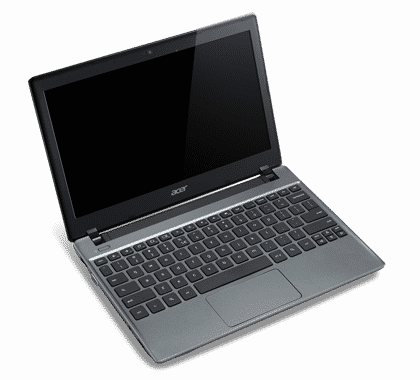
Acer America today debuts its new Acer C7 Chromebook, its next-generation mobile computer that runs Google’s Chrome operating system and is priced at a low $199.
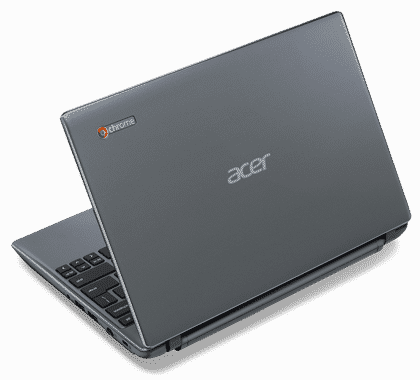
  

The new Acer C7 Chromebook is the ideal additional laptop for families, students and business people that need a fast, easy and secure way to get online to do their computing in the cloud, such as using Gmail, keeping up on social networks, shopping, and paying bills.

“Today’s computer users are doing more online heightening the need for enhanced security, quicker online access and an easy-to-use interface,” Jim Wong, corporate president, Acer Inc. “The Acer C7 Chromebook provides all this at an affordable price, making it the right choice for families and students on a budget as well as anyone who wants a new or second mobile PC for web-based computing.”

“The core of Google’s Chromebook vision is creating a better, more simple computing experience and making it available to everyone,” said Sundar Pichai, senior vice president, Chrome and Apps, Google. “We’re excited about the Acer C7 Chromebook, the newest addition to the Chromebook family. The Acer C7 delivers a hassle-free computing experience with the speed, security and simplicity that users expect of Chromebooks built in.”

Speedy, Secure Online Access
Customers can get online quickly with the Acer C7; it boots up in less than 18 seconds and resumes nearly instantly from sleep mode. The overall Chromebook experience is easy-to-use and navigate. Users can access their favorite apps with a single click through the app launcher and find new favorites from the thousands of Chrome apps and games featured in theChrome Web Store.

Customers will appreciate that the Acer C7 Chromebook has security features built in to defend against malware and viruses. Plus, since the Acer C7 is automatically updated, customers can be assured that they have the latest software version and protection against online threats. It comes with integrated 802.11b/g/n WiFi, so customers can quickly connect to hotspots and wireless networks.

Safe Storage, Convenient access to Content
The Acer C7 Chromebook is easy to maintain and share with others around the home, school or work. Users can have separate accounts and simply log in to get things done. Once on the Acer C7, it’s easy to share and collaborate on documents and projects and share work and personal calendars. Acer Chromebook customers are offered up to 100GB of free Google Drive storage for the first two years after purchase, so files, documents, photos and more are stored safely in the cloud even if the Acer C7 is lost, damaged or stolen. Customers can also access files offline, or create and edit Google Documents and use Gmail offline as well.

Sleek Design for the Mobile Lifestyle
The Acer C7 is portable and sleek for today’s on-the-go mobile lifestyle. It weighs only 3.05 pounds and measures a mere one inch thin, so it can be easily taken anywhere as it fits into a backpack, briefcase or purse. The slim size still houses a full-sized keyboard, so customers can comfortably create and edit documents and spreadsheets. The fully-clickable touchpad allows customers to conveniently get things done.

The Acer C7’s integrated HD 1.3MP webcam w/ LED indicator and microphone is great for video conferencing, as well as capturing video and photos for sharing online. Websites, documents, photos and high-definition video look crisp and clear on the C7’s 11.6-inch HD Widescreen CineCrystalTM LED-backlit LCD.

Appealing to frequent travelers, the Acer C7 Chromebook also enables users to get online at 30,000 feet with free Gogo in-air internet passes. It comes with 12 free passes (estimated at $150 value) that can be used over two years on domestic U.S. flights.

Acer Chromebook Built for Performance
The premiere offering in the Acer C7 Chromebook line is the Acer C710-2847. Powered by an Intel Celeron 847 processor (2MB L3 cache, 1.10GHz, DDR3 1333 MHz) and 2GB of DDR3 memory, the Acer C7 provides the performance to speed through the web, access files, enjoy video and more. It also has an ample 320GB HDD for storing files.

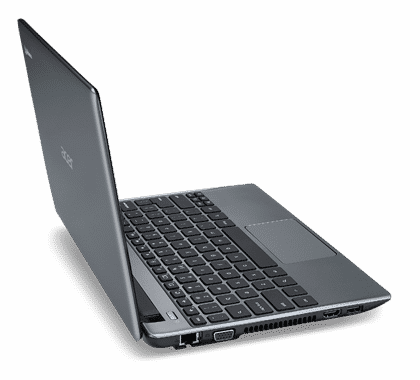
The Acer C7 connects to popular consumer electronics devices such as camcorders, digital cameras and smart phones via its three USB 2.0 ports. It also has an HDMI port for pushing video and content to external displays and HDTVs. In addition, its card reader supports SD card and MMC, so customers can play their music and video directly from the card, or upload photos, video and music to their favorite sites.

Pricing, Availability and Warranty
The Acer C710-2847 will be available starting tomorrow on the Google Play store, at Best Buy stores and on BestBuy.com for customers in the United States for $199.00.

The new Acer C7 comes with a standard one-year parts and labor warranty, which can be extended to three years with the Acer Advantage service. All Acer Chromebooks are backed by toll-free service and support.

Source: Acer | News Archive


Tags: